Friday, March 18, 2016

Installing PeopleSoft HCM 9.2 Image 16 on VirtualBox Part 1


This is the first HCM image PeopleSoft has delivered on PeopleTools 8.55. This image also uses Deployment Packages (DPK). The DPK contains all required software (database, application server, web server and client software), pre-installed and patched. I will detail my installation steps:

1    1)Navigate to the Oracle PUM HCM homepage (Doc ID 1641843.2) and download the VirtualBox image files into a directory on your local computer.


      2) Unzip the first file HCM-920-UPD-016-OVA_1of15.zip. This will create a setup folder in the same directory.


3    3) You will now need to run the Powershell script, psft-dpk-setup.ps1 located in the setup folder.
    
      4)Open the Powershell program and navigate to the setup folder. (In my case it was E:\VirtualMachines\HCMPI016).


      5) Run the script ./psft-dpk-setup.ps1. In some cases you may have to run the following command,Set-ExecutionPolicy Unrestricted, if you receive an error when trying to run the script. The script will extract all the files and then prompt for options


      6)The script will prompt for more options and then automatically start VirtualBox and continue installation.


      7) Enter the root password – This will be used later

     8) If you enter a hostname, use lowercase.


      9)  Once the DPKs are extracted the database, web server, application server and samba share will be configured and the process will be complete.


1    10)You can log in as the root user and type ifconfig to confirm your IP Address


     11) You can now navigate to the URL http://192.168.56.101:8000/ps/signon.html using your browser.


Thursday, March 17, 2016

SAML overview

I've been researching SAML integration with PeopleSoft. If you are new to SAML, this is a pretty good high level overview from the guys at Centrify.

https://www.youtube.com/watch?v=S9BpeOmuEz4

Monday, November 16, 2015

Viewing the PUM share on Windows 7

If you use Windows 7 and cannot see the share you might check the following setting on your registry:

  • Open a command prompt window and run regedit.exe
  •   Goto HKEY_LOCAL_MACHINE\SYSTEM\CurrentControlSet\services\LanmanWorkstation\Parameters
  •   Change the subkey "RequireSecuritySignature" value from 1 to 0.
  •   Reboot the machine


Tuesday, November 10, 2015

SQR source files in PUM Images

Update on this. In the newer images PeopleSoft has put the source files under the PS_APP_HOME directory. I've also been using FileZilla FTP client as I found that WinSCP was disconnecting me while downloading large files.

1) Log into the PUM via FTP client using the root user (I use FileZilla)
2) Navigate to the /opt/oracle/psft/pt/ps_app_home/sqr directory

I recently had a need to look at one of the delivered SQR source files in the HR PUM Image. Here is how you get there when the PUM Image is running:

1) Log into the PUM via FTP client using the root user (I use WinSCP)
2) Navigate to the /opt/oracle/psft/ptdb/apptools/sqr directory

Thanks to Sasank Vemana for the assistance on this! You can check out his blog here

Tuesday, July 21, 2015

DoModal using PeopleTools 8.53

I have been trying to create modal windows in PeopleTools 8.53 using the delivered DoModal() function. I was unsuccessful until I ran across this article on MOS (Doc ID 1390037.1). You need to go to your web profile and add a custom property called EnablePCModal, type: Boolean, value: true. Be aware this is a sytem wide change so you'll want to test accordingly.

Wednesday, May 20, 2015

PS Utilities for Chrome Extension

I recently found a nifty tool that works with the Chrome browser called PS Utilities. It is very handy to find page and field information. Check it out here:

https://chrome.google.com/webstore/detail/ps-utilities/jajoopnifcliapcngocgiidifkmboemc?utm_source=gmail

Thursday, May 14, 2015

Finding Query tree and access group by user


I ran into a situation where I needed to find out what query tree and access group a particular user had access too. I used the sql below to help find the information.

SELECT C.ROLEUSER, C.ROLENAME, B.CLASSID, A.TREE_NAME, A.ACCESS_GROUP
 FROM PS_SCRTY_ACC_GRP A, PSROLECLASS B, PSROLEUSER C
WHERE A.CLASSID = B.CLASSID
AND B.ROLENAME = C.ROLENAME
AND C.ROLEUSER = :1

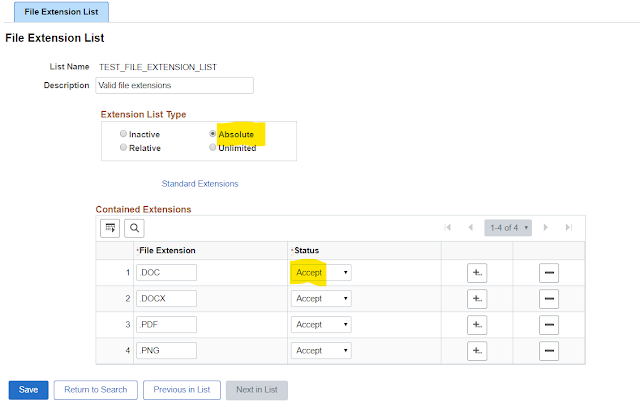
How to restrict File Types (extensions) in PeopleSoft

I recently had a requirement to only allow certain types of files to be uploaded to PeopleSoft. I wanted a solution that didn't requir...